


AI Home & Garden Design - Ruma
4.72.00 Reviews
App Specs
- Version
- 1.2.39
- Updated On
- License
- Free
- Downloads
- 50,000+
- Developer
- EXXE Dijital Teknoloji A.Ş.
- Categories
- House & Home
- Platform
- Android
Screenshots
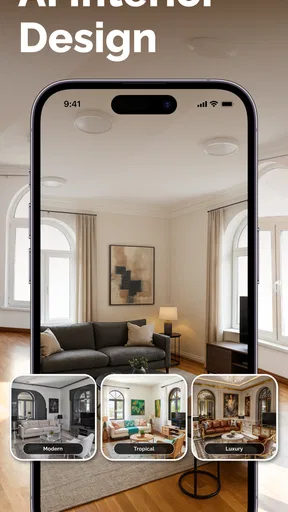

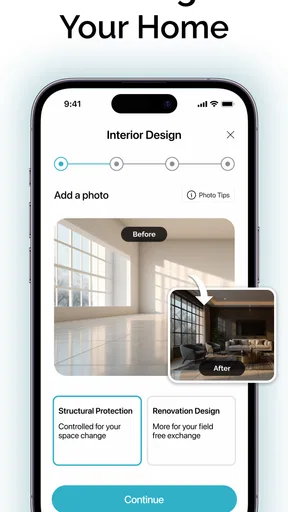
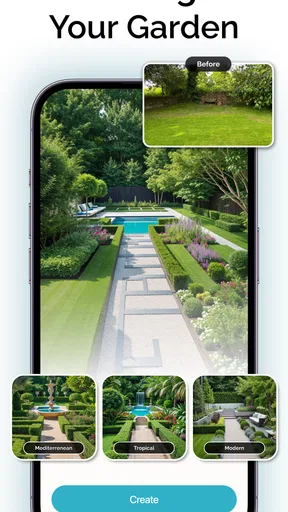
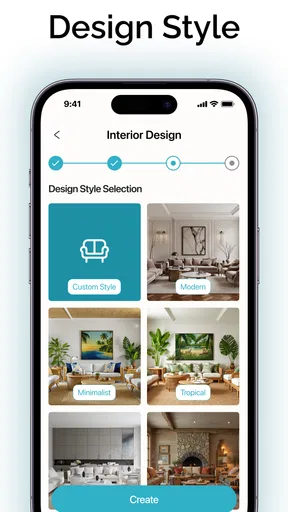
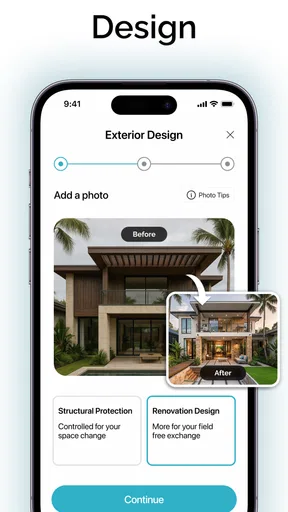
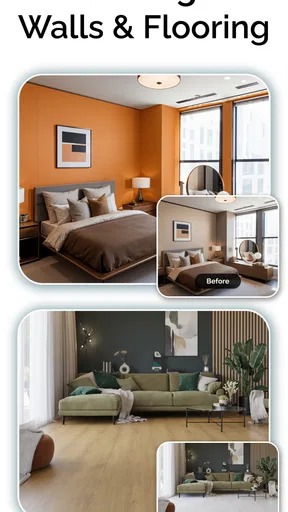
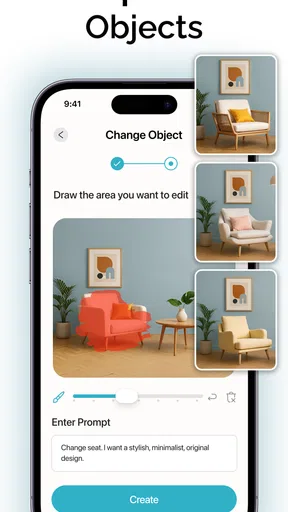
 Analysis by AppCompare
When I’m deciding whether a home-design app is worth trying, I ask one practical question first: will it help me think through a change before I spend time or money on it? AI Home & Garden Design - Ruma is aimed at that early, visual part of a project. It gives me a place to explore ideas for rooms and outdoor spaces, rather than replacing the careful measuring, budgeting, and planning that a real renovation still needs.
That distinction matters. I’d reach for Ruma when I have a vague idea—perhaps a calmer living room or a more welcoming patio—and want to make it easier to picture. I wouldn’t treat a generated design as a construction plan or assume that a visual concept guarantees a piece of furniture will fit. Used as an inspiration and decision aid, it can make the first step feel less abstract.
Start with the decision you need to make
Before opening a design tool, I find it useful to name the choice I’m stuck on. Is the room’s color the problem, or is it the arrangement? Do I want the garden to feel greener, or do I need to rethink how I use it? Going in with one question helps me compare ideas instead of browsing styles indefinitely. Ruma’s mix of home and garden design makes it especially suited to people who are still exploring the direction of a project.
For example, if I’m considering a new look for a small sitting area, I can use the app to test a general style and see whether the overall mood appeals to me before shopping. If I already know the exact dimensions, materials, and products I need, a measuring tool, floor-plan app, or retailer’s room planner may be more useful for the next stage. The best choice depends on whether I need inspiration or precision.
Where Ruma makes the most sense
The strongest reason to try Ruma is that it brings indoor and outdoor ideas into one creative space. I can use it to think about a room refresh, then switch to a garden concept without treating those as unrelated projects. Its customization options, including changing wall colors and exploring plants, make it easier to think beyond a single preset look. That’s useful when I like the broad direction of a design but want to make it feel more personal.
The app is free to install, is listed for Everyone, and is developed by EXXE Dijital Teknoloji A.Ş. It has a 4.7 average from around 440 ratings, with over 10,000 installs. Those figures suggest that people are finding it, but I’d still judge it by whether its design approach suits my own project. It was released in March 2025, and version 1.2.30 is the current version. It supports Android 9 and later, so I’d check my device’s operating system before planning to use it.
How it compares with other ways to plan a space
Compared with browsing photos on a mood-board app, Ruma is more about imagining a design in relation to your own home or garden. Compared with a detailed floor-plan tool, it leans toward visual exploration rather than exact technical planning. And compared with sketching on paper, it offers a more immediate way to try different looks. I’d see those options as complementary: collect references first, explore a direction in Ruma, then measure and verify details with tools designed for accuracy.
Worth Reading Before You Choose

EA SPORTS FC Mobile 26 Is a Bigger Football Game, but It Takes Time

Flipboard Shows What News Apps Must Do Beyond the Feed

Switching to Android Auto Means Rethinking Your Driving Routine

Google Calendar Makes a Crowded Week Easier to Manage

Ludo King Makes the Most of the Minutes Between Plans

Baby Panda World Brings Quick Play to Modern Phones, but Its Game Library Feels Busy
That workflow can prevent a common mistake: falling in love with a style image without checking whether it suits the room you actually have. I’d make a short list of what must stay—such as a desk, a walkway, or an existing plant—and use that as a reality check while exploring. For a garden, I’d also treat a visual arrangement as a starting point, not proof that a plant will thrive in a particular spot. Practical conditions still matter.
What to know before committing time or money
Some in-app purchases cost between $5.99 and $59.99 per item, so I’d explore the free experience before paying for anything. The range is wide enough that I would check exactly what an item unlocks and whether it helps with the decision I’m trying to make. If I only want a few ideas for a weekend refresh, paying may not be worthwhile; if I’m using the app repeatedly to compare concepts for a larger project, a paid option could make more sense, depending on what it includes.
There is also a switching cost to consider. If I build up a set of ideas in one design app and then move to a floor planner or a retailer’s tool, I may need to recreate the concept there. I’d keep notes on the choices I like—colors, layout priorities, and the overall feel—rather than relying on an app design alone to carry every detail into the next stage. That makes it easier to compare options without confusing inspiration with a final specification.
Who I’d recommend it to
I’d recommend Ruma to someone who enjoys visual experimentation and wants a friendly starting point for a home or garden refresh. It may be especially helpful if you’re sharing ideas with a partner or family member: showing two possible directions can make a conversation more concrete than saying “I want the room to feel warmer.” For renters, it can also be a way to explore reversible changes such as color and decor before deciding what is realistic in a space they don’t own.
I’d skip it, or pair it with a more precise tool, if my main need were measured floor plans, contractor-ready drawings, product availability, or a dependable estimate of what a renovation will cost. I’d also be cautious about using any visual concept as a substitute for checking dimensions and practical constraints. The app can help me decide what I like; it can’t make the physical checks unnecessary.
A realistic use would be a Saturday afternoon when I’m unsure whether my living room needs a new color scheme or a different arrangement. I could try a few visual directions, note which one feels most comfortable, and then measure the space before moving furniture or shopping. For a garden, I might compare a planting idea with the areas I actually use, then check sunlight and maintenance needs separately. The useful outcome is not necessarily a finished design—it may simply be knowing which idea is worth investigating.
Before downloading, I’d ask myself whether I want inspiration, precision, or shopping help. Ruma appears best suited to the first of those, with customization that can help shape an idea. If I want precise dimensions, I’d choose a floor-plan app; if I want to browse products, I’d use a retailer’s planner; if I’m still deciding on the overall look, Ruma is the more natural place to begin. Keeping that role clear makes it easier to judge its value and avoid expecting it to do every part of a home project.
Getting Started with Ruma
First things first, the installation process was a breeze. I hopped onto the app store, hit download, and voilà, Ruma was ready to rock. When you open the app for the first time, you're greeted with a sleek, user-friendly interface that's as inviting as a cozy living room. It's intuitive enough that even your tech-challenged aunt could navigate it without a hitch.
Features That Wow
Now, let's dive into the features because that's where the real magic happens. Whether you're looking to revamp your living room or spruce up your backyard, Ruma has got you covered with its impressive array of tools. You can choose from a variety of design templates that cater to different styles and preferences. From modern minimalism to rustic charm, the options are endless.
One feature that truly blew my mind was the augmented reality tool. Imagine being able to visualize how that new couch or patio set will look in your space before making a purchase. Just point your camera, and voilà, the app overlays the design elements right in your room or garden. It's like having a crystal ball that shows you the future of your home decor.
Personal Customization
What makes Ruma stand out is its personalization options. You can tweak every little detail to suit your taste. Want to change the color of the walls? No problem. Thinking of adding some greenery? They've got a whole library of plants to choose from. It's like playing a game of Sims, but with your actual home.
Community and Inspiration
Feeling stuck or in need of a little inspiration? The app's community section is a treasure trove of ideas. You can browse through other users' designs, get inspired by their creativity, and even share your own masterpieces. It's a vibrant space where creativity flows, and you never know—you might just stumble upon the perfect idea for your next project.
To get more from those tools, I’d change one kind of thing at a time. If I switch the wall color, plant choices, and overall style all at once, I may like the result without knowing which decision made it work. Trying a small set of alternatives makes the comparison more useful and gives me a clearer brief to take into a conversation with someone else. It is a simple habit, but it turns browsing into a decision rather than a string of attractive possibilities.
The community is most useful to me as a source of prompts, not as a standard I have to match. A design that looks appealing in another home may depend on different light, room proportions, or everyday habits. I’d save the underlying idea—such as a color pairing or a way of bringing greenery into a space—and adapt it to my own constraints. Sharing a concept can also help explain what I mean, though I would still confirm the practical details independently.
The Nitty-Gritty Details
Okay, let's talk about the technical stuff. The app runs smoothly without any glitches or crashes, which is a huge plus in my book. It's also pretty lightweight, so it won't hog all your phone's storage. And let's not forget about the seamless integration with online stores. You can purchase furniture and decor items directly through the app, making the whole process as easy as pie.
One thing to keep in mind, though, is that some premium features are locked behind a subscription. But honestly, the free version offers more than enough tools to get your creative juices flowing.
My practical advice is to treat any product or furniture idea as a prompt for a second check. Before buying, I’d verify the item’s real measurements, finish, and suitability for the space rather than assuming a visual preview settles those questions. A room can look balanced on screen and still feel cramped once people need to walk through it. In a garden, a pleasing layout likewise needs to be checked against how the space is used and maintained.
For someone comparing the app with a professional designer, the difference is not simply convenience. A design app is a low-pressure way to explore preferences and arrive with clearer questions; a person working on the project can account for constraints and decisions that a visual concept may not resolve. I’d use Ruma to clarify what I want, then seek expert help when the job involves structural changes, complicated installation, or choices where a wrong assumption would be expensive.
Final Thoughts
So, would I recommend AI Home & Garden Design - Ruma? Absolutely! Whether you're a seasoned designer or a newbie just dipping your toes into the world of home decor, this app is a fantastic companion. It makes the whole process fun, engaging, and most importantly, stress-free.
If you’re ready to give your home or garden the makeover it deserves, why not give Ruma a shot? You might just find yourself wondering how you ever lived without it.
My recommendation is strongest for the person at the beginning of a project: curious, open to trying looks, but not yet ready to settle on a shopping list. I’d use it to turn a loose preference into a direction I can discuss and test. I would not make it my only planning method for a major renovation, a tightly measured room, or a garden where site conditions determine what will work. In those cases, the right companion is a more exact tool or qualified help.
There are a couple of sensible questions to answer before making it part of a routine. If I’m on Android 9 or later, the listed system requirement is met; I’d still make sure the device is comfortable for viewing and working with room imagery. If I’m deciding whether to pay, I’d first identify the specific option I need and compare that purchase with how often I expect to use it. The free starting point is a useful way to judge whether the design process fits me before spending.
Overall, I like Ruma most as a bridge between “I want to change this space” and “I know what I want to try next.” Its home-and-garden focus, templates, customization, visual preview, and community inspiration give me several ways to explore without needing to begin with a polished plan. Keep measurements and real-world constraints in the loop, and it can be an enjoyable, practical first stop for shaping a room or outdoor refresh.
Pros
- User-friendly interface for easy navigation.
- High-quality 3D rendering of designs.
- Extensive library of furniture and decor.
- Customizable templates for quick setups.
- Real-time collaboration with friends or family.
Cons
- Requires a stable internet connection.
- Some features locked behind a paywall.
- Occasional slow loading times.
- Limited free design options.
- No offline mode available.
FAQs for AI Home & Garden Design - Ruma
What is AI Home & Garden Design - Ruma?
AI Home & Garden Design - Ruma is an innovative app designed to help users plan and visualize home and garden designs using artificial intelligence. It provides easy-to-use tools for creating detailed layouts, selecting plants, furniture, and decor, and offers customization options to suit personal preferences.
How user-friendly is the app for beginners?
AI Home & Garden Design - Ruma is highly accessible for beginners, featuring an intuitive interface with drag-and-drop functionality. It includes tutorials and guided steps to assist users in designing their spaces, making it easy even for those with no prior design experience.
What features does the app offer for garden design?
The app offers a variety of features tailored for garden design, including plant selection guides, seasonal planting tips, and 3D visualization tools. Users can simulate different layouts and see how their garden will look across various seasons, enhancing their planning and design experience.
Is there a cost associated with using AI Home & Garden Design - Ruma?
AI Home & Garden Design - Ruma offers a free version with basic features, but to access advanced tools and premium content, users may need to subscribe to a paid plan. The subscription provides additional benefits, such as exclusive design templates and expert advice.
Can I integrate the app with other smart home devices?
Yes, AI Home & Garden Design - Ruma allows integration with various smart home devices. This feature enables users to incorporate smart lighting, irrigation systems, and more into their designs, offering a seamless and modern approach to home and garden planning.


